Synchronizing audio with video
Learn here how to easily spot your audio files to Playhead or TimeCode in Freque.
Spotting using the Sync Point
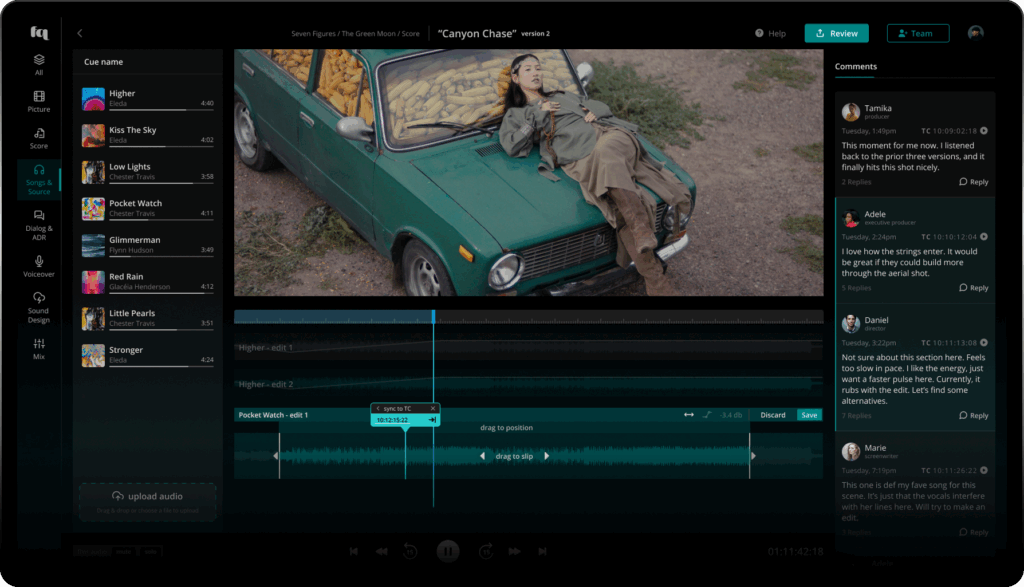
If you need frame accurate precision, we’ve got just the right tool for you: while in Edit Mode, click the ‘Sync’ button in the top left of the audio edit. You now have two options:
- You can sync to playhead. Simply place the playhead at the frame where you would like the audio edit to slide to. You can use the mouse or the left and right arrow keys. Next, hit the ‘playhead’ button. Whoosh. It’s spotted.
- You can spot it to a timecode. When you click ‘TimeCode’ in the Sync Point, you can now enter the timecode unit by unit. Try using the up- and down-arrow keys for incremental adjustments, or the left- and right-arrow keys to move to the next unit. Or simply type the numbers. Once done, click the arrow button to the right, and Zwoooosh! It’s spotted. Please note, the timecode Freque may needs to be offset to correspond to the film. You can adjust this in the edit settings here.
It gets even better: you can drag that Sync Point tool to any part within the audio edit and sync to that particular point. This is great if there is a hit that needs to correspond to a particular moment in the picture, or a ramp at the end that needs to hit a certain frame.